We have now made the main design decisions behind the Wire Finance device model.
We know what kinds of devices exist.
We know how they are named.
We know how they receive a Microsoft Entra device identity.
We know how device groups separate provisioning intent from operational state.
And we know how Windows Autopilot identifies which provisioning path a device should follow.
Now we can put those decisions together.
The question becomes:
What should happen from the moment Wire Finance receives a corporate Windows device to the point where an employee can safely begin work?
That is the Standard Corporate Provisioning Journey.
Our Pilot Example
We will use Olivia Carter and the first standard Wire Finance endpoint as our reference.
Employee:
Olivia Carter

Role:
Finance Analyst

Device Asset:
WF-LT-001

Device Type:
Standard Corporate Endpoint

Ownership:
Corporate

Autopilot Classification:
CORPORATE

Provisioning Group:
SG-DEVICES-AUTOPILOT-CORPORATE
WF-LT-001 represents the Wire Finance asset and naming standard for the endpoint.
The actual Windows hostname may initially differ where the provisioning platform cannot automatically apply the sequential WF-LT-### naming model.
The asset identity and Windows hostname should therefore not be confused.
Lab Pilot Note
The first Wire Finance endpoint is represented using a Windows 11 Pro virtual machine in VirtualBox.
This allows us to test the same Microsoft Entra Join, Intune enrollment, Windows Autopilot, application deployment, and management journey without consuming unnecessary Azure infrastructure.
Conceptually:
Production Scenario
Physical Corporate Laptop

        and

Wire Finance Lab
Windows 11 Pro Virtual Machine

        ↓

Same Corporate Provisioning Model
The virtual machine represents the corporate endpoint lifecycle.
It does not change the identity or management principles being tested.
The Provisioning Goal
Wire Finance uses a user-driven Windows Autopilot deployment for standard corporate Windows endpoints.
The objective is to move from:
Approved Corporate Device
        ↓
Recognised Device
        ↓
Provisioned Device
        ↓
Managed Device
        ↓
Secured Device
        ↓
Validated Device
        ↓
Ready for Employee Use
with as little manual device-building activity as possible.
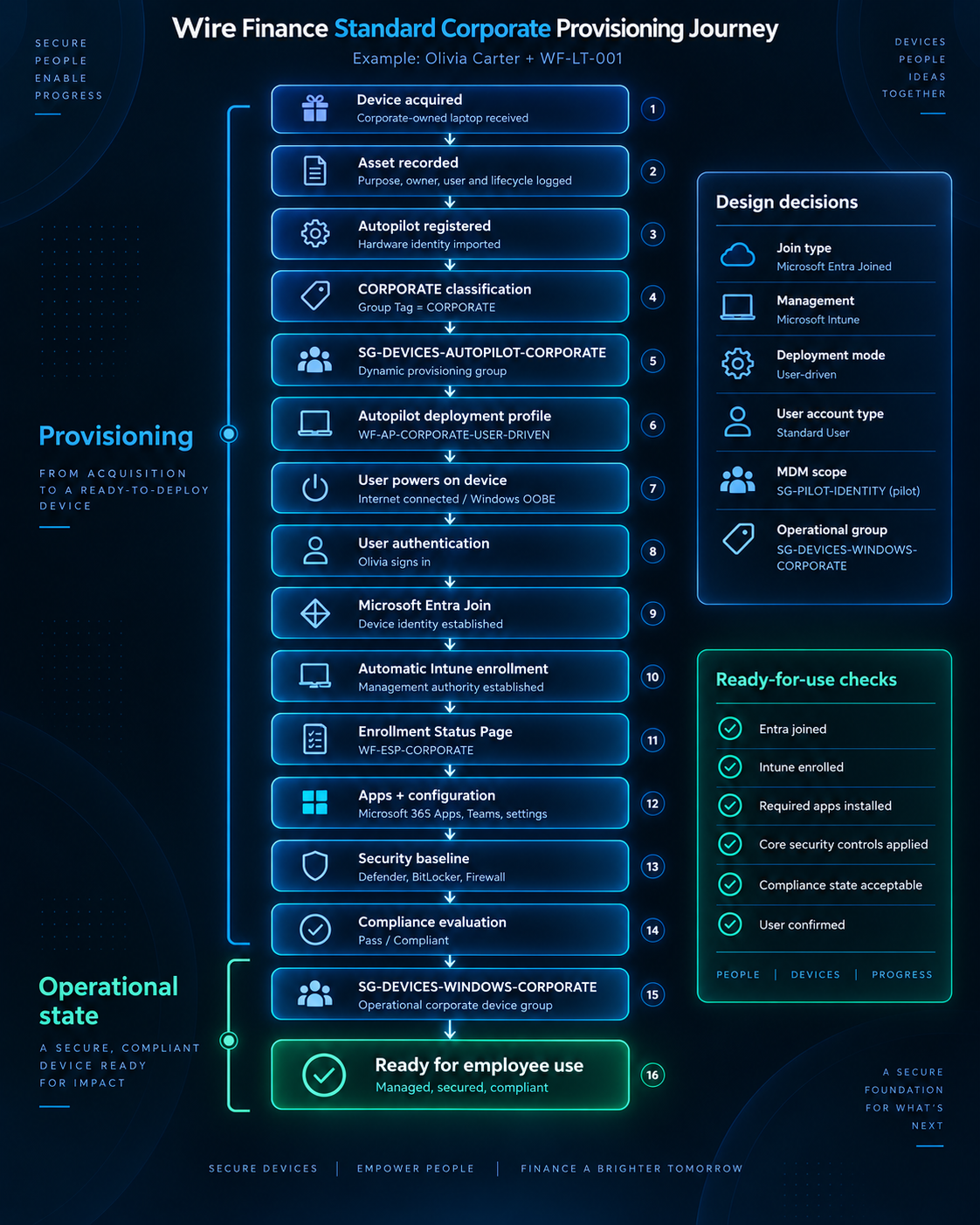
The Journey at a Glance
The provisioning journey can be grouped into eight major stages.
| Stage | What Happens | Result |
|---|---|---|
| 1. Asset and purpose recorded | Wire Finance records ownership, purpose, classification, and intended assignment | Corporate asset recognised |
| 2. Autopilot registered and classified | Hardware identity is registered and tagged CORPORATE |
Provisioning intent established |
| 3. Deployment targeted | Device enters the Autopilot corporate group and receives the standard deployment profile | Provisioning path defined |
| 4. Employee begins OOBE | User powers on, connects to the internet, and authenticates | Organisational provisioning begins |
| 5. Entra Join and Intune enrollment | Device receives its cloud identity and management relationship | Identity and management established |
| 6. Required configuration delivered | ESP, applications, settings, and required controls are applied | Working corporate configuration established |
| 7. Security and compliance evaluated | Endpoint-security state and compliance requirements are assessed | Operational security state established |
| 8. Final validation | IT verifies identity, management, assignment, applications, and required security state | Ready for business use |
These stages do not mean the same thing.
A device may successfully complete one stage without being ready for employee use.
Before the Employee Powers On
Provisioning does not begin when Olivia opens the box.
Several things must already exist.
| Requirement | Wire Finance Position |
|---|---|
| User identity | Olivia Carter exists in Microsoft Entra ID |
| User licensing | Required Microsoft 365 services assigned |
| Automatic Intune enrollment | Pilot scope includes SG-PILOT-IDENTITY |
| Device ownership | Corporate |
| Autopilot registration | Complete |
| Group Tag | CORPORATE |
| Provisioning group | SG-DEVICES-AUTOPILOT-CORPORATE |
| Autopilot profile | WF_AP_CORPORATE_USER_DRIVEN |
| Join type | Microsoft Entra joined |
| User account type | Standard User |
| Enrollment Status Page | WF-ESP-CORPORATE |
| Required applications / configuration | Targeted before deployment where required |
This gives us an important lesson:
the employee powering on the device is not the beginning of the provisioning process.
Much of the design and targeting work has already happened.
Stage 1 — Record the Asset and Its Purpose
The journey begins with a company-controlled asset.
Before Microsoft Entra ID or Intune knows anything about the endpoint, Wire Finance records what the device is supposed to become.
For our pilot:
Asset:
WF-LT-001

Purpose:
Standard Corporate Endpoint

Ownership:
Wire Finance

Intended User:
Olivia Carter

Provisioning Classification:
CORPORATE
The asset record and cloud device identity are different things.
Asset Register
        ↓
Physical ownership and assignment

Microsoft Entra ID
        ↓
Cloud device identity
Physical ownership comes first.
Stage 2 — Register and Classify the Device
The device hardware identity is registered with Windows Autopilot.
Autopilot can now recognise the endpoint when Windows begins its Out-of-Box Experience.
The device is classified using:
Group Tag:
CORPORATE
which is represented through the Autopilot device information as:
[OrderID]:CORPORATE
This classification answers:
Which provisioning path should this device follow?
It does not answer:
Is this device secure or compliant?
That distinction remains important throughout the journey.
Stage 3 — Target the Corporate Provisioning Path
The CORPORATE classification allows the device to satisfy the dynamic rule for:
SG-DEVICES-AUTOPILOT-CORPORATE
Conceptually:
CORPORATE
      ↓
[OrderID]:CORPORATE
      ↓
Dynamic Device Rule
      ↓
SG-DEVICES-AUTOPILOT-CORPORATE
That group identifies the population that should receive the standard Wire Finance Autopilot configuration.
The implemented deployment profile is:
WF_AP_CORPORATE_USER_DRIVEN
Its important design decisions include:
Deployment Mode:
User-Driven

Join Type:
Microsoft Entra Joined

User Account Type:
Standard User

Pre-Provisioning:
Not used for this journey
The group answers:
Which devices should receive the configuration?
The profile answers:
How should those devices be provisioned?
Stage 4 — Olivia Begins Windows OOBE
Olivia receives the endpoint, powers it on, and connects it to the internet.
Windows enters the Out-of-Box Experience.
Device
      ↓
Power On
      ↓
Internet Connection
      ↓
Windows OOBE
      ↓
Autopilot Service
      ↓
Wire Finance Provisioning Profile
Olivia authenticates using her Wire Finance workforce identity.
Her user identity and the endpoint’s device identity remain separate security objects.
Olivia Carter
      ↓
User Identity

Corporate Endpoint
      ↓
Device Identity
The provisioning process brings those two identities into an organisational relationship without turning them into the same thing.
Stage 5 — Microsoft Entra Join and Intune Enrollment
The device joins the Wire Finance Microsoft Entra tenant.
This establishes its organisational cloud identity.
Windows Device
      ↓
Microsoft Entra Join
      ↓
Wire Finance Device Identity
But:
Microsoft Entra Joined
        ≠
Fully Managed

Microsoft Entra Joined
        ≠
Compliant

Microsoft Entra Joined
        ≠
Ready for Use
The next relationship is management.
During the pilot, automatic MDM enrollment is scoped to:
SG-PILOT-IDENTITY
Because Olivia is part of the approved pilot population, the qualifying device can automatically enroll into Microsoft Intune during the join process.
Microsoft Entra Join
        +
Eligible Pilot User
        ↓
Automatic Intune Enrollment
The distinction remains:
Microsoft Entra ID
        ↓
Device Identity

Microsoft Intune
        ↓
Device Management
Both matter, but they answer different questions.
Stage 6 — Provision the Working Environment
Once Intune management is established, Wire Finance can begin delivering the configuration required for normal employee use.
The corporate Enrollment Status Page is:
WF-ESP-CORPORATE
Its job is to track provisioning progress and prevent premature access to the normal Windows experience where required components have not completed.
Conceptually:
Device Preparation
        ↓
Device Configuration
        ↓
Required Applications
        ↓
User Configuration
        ↓
Ready to Continue
Wire Finance deliberately avoids making every optional application a hard provisioning dependency.
The objective is not:
Every Possible Application
Must Finish Before Desktop
It is:
Everything Required
for Safe Initial Business Use
Must Be Ready
Required applications and configuration can include areas such as:
- Company Portal
- Microsoft 365 Apps
- approved Windows settings
- browser configuration
- update configuration
- other required corporate applications
The exact application and configuration catalogue can evolve without changing the overall provisioning model.
Standard User Rights
A standard employee endpoint should not make the employee a local administrator simply because they enrolled the device.
The corporate Autopilot profile therefore provisions the user as:
Standard User
not:
Local Administrator
For Olivia:
Olivia Carter
      ↓
Corporate Endpoint
      ↓
Standard User Rights
This supports the same least-privilege principle used throughout the Wire Finance identity design.
Administrative capability should be introduced through controlled mechanisms rather than being permanently attached to the normal employee account.
Stage 7 — Establish Security and Compliance State
Being enrolled in Intune does not automatically mean the endpoint has reached the required security state.
The device still needs to receive and maintain the relevant Wire Finance security controls.
These may include areas such as:
- Microsoft Defender for Endpoint
- BitLocker
- Windows Firewall
- endpoint-security configuration
- attack-surface reduction
- security baselines
- controlled local administration
Those controls are covered in more detail later in the Device Security and Compliance section.
The important sequence here is:
Device Identity
        ↓
Management
        ↓
Security Controls
        ↓
Compliance Evaluation
Intune can then evaluate whether the endpoint satisfies the organisation’s defined compliance requirements.
Conceptually:
Corporate Endpoint
        ↓
Compliance Requirements
        ↓
Evaluation
        ↓
Compliant
or
Noncompliant
Compliance does not create device identity.
It describes the device’s current relationship with defined organisational requirements.
From Provisioning Intent to Operational State
Earlier in the journey, the device belonged to:
SG-DEVICES-AUTOPILOT-CORPORATE
That group answers:
How should this device be provisioned?
After successful enrollment and management, the endpoint can also satisfy the operational corporate Windows rule for:
SG-DEVICES-WINDOWS-CORPORATE
That group answers a different question:
Which Windows devices are now
corporate-owned, managed,
enabled operational endpoints?
This is an important transition:
Provisioning Intent
        ↓
SG-DEVICES-AUTOPILOT-CORPORATE

        becomes

Operational State
        ↓
SG-DEVICES-WINDOWS-CORPORATE
The device may remain a member of both groups.
That is expected because the groups represent different facts.
Stage 8 — The Ready-for-Use Gate
A successful sign-in is not the definition of successful provisioning.
Before Wire Finance considers the endpoint ready for normal business use, the final state should be validated.
| Validation | Expected State |
|---|---|
| Asset record exists | Confirmed |
| Corporate ownership recorded | Confirmed |
| Autopilot registration present | Confirmed |
CORPORATE classification correct |
Confirmed |
| Correct Autopilot profile applied | Confirmed |
| Microsoft Entra joined | Confirmed |
| Intune enrolled | Confirmed |
| Assigned user recorded correctly | Confirmed |
| Standard user rights | Confirmed |
| Required applications available | Confirmed |
| Required configuration applied | Confirmed |
| Required security controls | Confirmed when implemented |
| Compliance state | Acceptable |
| Operational device-group membership | Expected state confirmed |
Only then do we reach:
Corporate Asset
      +
Device Identity
      +
Management
      +
Applications
      +
Security
      +
Compliance
      +
Validation
      ↓
READY FOR BUSINESS USE
There is a meaningful difference between:
The device turns on
and:
The device is ready for Wire Finance
What If Provisioning Fails?
A real provisioning model needs a failure path.
A device may fail to:
- receive the correct Autopilot profile
- join Microsoft Entra ID
- enroll into Intune
- receive a required application
- complete the Enrollment Status Page
- receive a required configuration
- reach an acceptable compliance state
The response should not be:
Close Enough
      ↓
Give Device to Employee
Instead:
Provisioning Failure
        ↓
Identify Failed Stage
        ↓
Review Autopilot / Entra / Intune State
        ↓
Correct the Cause
        ↓
Retry, Reset, or Reprovision
        ↓
Validate Again
A failed identity, management, or required-security stage is not solved by handing the employee an unfinished endpoint.
The Device Naming Constraint
The Wire Finance naming standard remains:
WF-LT-###
For example:
WF-LT-001
WF-LT-002
WF-LT-003
However, the provisioning platform does not maintain a true organisation-wide sequential counter for that naming model.
Native Autopilot naming mechanisms are better suited to patterns based on serial information or generated characters.
Wire Finance therefore keeps an important distinction:
Asset / Design Naming Standard
        ↓
WF-LT-###

Windows Hostname Automation
        ↓
Subject to Platform Capability
For the initial pilot, automatic device-name templating is not relied upon to produce the sequential WF-LT-### convention.
This is a useful example of the difference between:
what the organisation wants the architecture to look like
and:
what the platform can automate natively.
The implementation process must reconcile the two without pretending the limitation does not exist.
Standard Corporate Provisioning Decision
The standard provisioning design can now be summarised as:
Provisioning Method:
Windows Autopilot

Deployment Mode:
User-Driven

Join Type:
Microsoft Entra Joined

Management:
Microsoft Intune

Automatic MDM Enrollment:
Required

Initial MDM Scope:
SG-PILOT-IDENTITY

Autopilot Classification:
CORPORATE

Provisioning Group:
SG-DEVICES-AUTOPILOT-CORPORATE

Autopilot Profile:
WF_AP_CORPORATE_USER_DRIVEN

Enrollment Status Page:
WF-ESP-CORPORATE

User Account Type:
Standard User

Operational Group:
SG-DEVICES-WINDOWS-CORPORATE

Ready-for-Use Requirement:
Identity, management, required applications,
security state, compliance, and final validation
One Journey, Different States
The provisioning journey becomes easier to understand when each stage is treated separately.
Acquired
      ↓
Wire Finance owns the asset.

Registered
      ↓
Autopilot recognises the hardware.

Classified
      ↓
We know which provisioning path it should follow.

Microsoft Entra Joined
      ↓
The device has an organisational identity.

Intune Enrolled
      ↓
Wire Finance can manage it.

Configured
      ↓
Required applications and settings are present.

Secured
      ↓
Required endpoint controls are applied.

Evaluated
      ↓
Compliance state is known.

Validated
      ↓
The endpoint is ready for employee use.
No single stage replaces the others.
Corporate-Owned
        ≠
Ready for Use

Microsoft Entra Joined
        ≠
Ready for Use

Intune Enrolled
        ≠
Ready for Use
The complete provisioning journey turns individual states into a managed corporate endpoint.
We now know how a standard employee device should move from acquisition to normal business use.
But a workstation used for privileged administration carries a very different level of risk.
WF-PAW-001 cannot simply follow the same journey with a different name.
The next question is:
What needs to change when the device being provisioned is a Privileged Access Workstation?