The standard corporate provisioning journey gives Wire Finance a repeatable way to turn a Windows laptop into a managed employee endpoint.
But privileged administration raises the security bar.
A device used to administer identities, endpoints, security services, or other sensitive systems should not simply be:
Normal Laptop
      +
Extra Permissions
Wire Finance therefore uses a separate Privileged Access Workstation, or PAW, for approved administrative activity.
The principle is simple:
a Privileged Access Workstation is not just another company laptop with extra permissions. It is a separately classified and hardened device dedicated to administrative activity.
Our Privileged Example
We will use Jordan Lee to illustrate the PAW model.
Employee
Jordan Lee

Normal Identity
jordan.lee@wirefinance.com

Privileged Identity
adm-jordan.lee@wirefinance.com

Privileged Device
WF-PAW-001

Autopilot Classification
PAW

Provisioning Group
SG-DEVICES-PRIVILEGED
Jordan still has a normal employee identity and standard corporate endpoint for everyday work.
The privileged workstation exists for something else:
Approved Administrative Activity
This creates separation at both the identity and device layers.
jordan.lee
      ↓
Standard Corporate Endpoint
      ↓
Normal Business Activity
while:
adm-jordan.lee
      ↓
WF-PAW-001
      ↓
Approved Administrative Activity
That distinction is fundamental to the Wire Finance privileged-access model.
PAW Design Standard
The initial PAW design is:
| Decision | Wire Finance PAW Standard |
|---|---|
| Ownership | Corporate |
| Device class | Privileged Access Workstation |
| Naming | WF-PAW-### |
| Autopilot Group Tag | PAW |
| Provisioning Group | SG-DEVICES-PRIVILEGED |
| Join Type | Microsoft Entra joined |
| Management | Microsoft Intune |
| Provisioning | Windows Autopilot |
| Local User Rights | Standard / least privilege |
| Administrative Identity | Approved adm-* identity |
| Routine Productivity Use | Not permitted |
| Security Configuration | Dedicated hardened PAW baseline |
| Compliance | Dedicated privileged-device requirements |
| Administrative Access | Separately authorised |
There is an important point here.
A PAW still uses:
Microsoft Entra Join
        +
Microsoft Intune
just like a normal Wire Finance corporate endpoint.
The stronger security posture does not come from inventing a special join type.
It comes from the controls surrounding the device.
Different Classification
        +
Dedicated Provisioning
        +
Stricter Security Controls
        +
Stricter Compliance
        +
Restricted Usage
        +
Approved Privileged Identity
So:
Same Cloud Identity Platform
        ≠
Same Security Tier
A PAW Starts With a Privileged Requirement
A normal employee laptop may be issued because somebody joins Wire Finance and needs a productivity device.
A PAW should not be issued simply because:
Jordan Works in IT
That is not enough.
There must be an approved administrative requirement.
For example:
Jordan Lee
Head of Security Operations
        ↓
Approved Privileged Responsibilities
        ↓
Separate adm-jordan.lee Identity
        ↓
Dedicated PAW Required
The chain is therefore:
Business Responsibility
        ↓
Privileged Requirement
        ↓
Approved Privileged Identity
        ↓
Approved Privileged Device
This prevents privileged workstations from becoming normal equipment handed out simply because somebody has a technical job title.
The Privileged Workstation Journey
The PAW journey begins before Windows is provisioned.
Wire Finance must first establish that a genuine privileged-administration requirement exists.
Only then is the device approved, classified, provisioned, hardened, and validated.
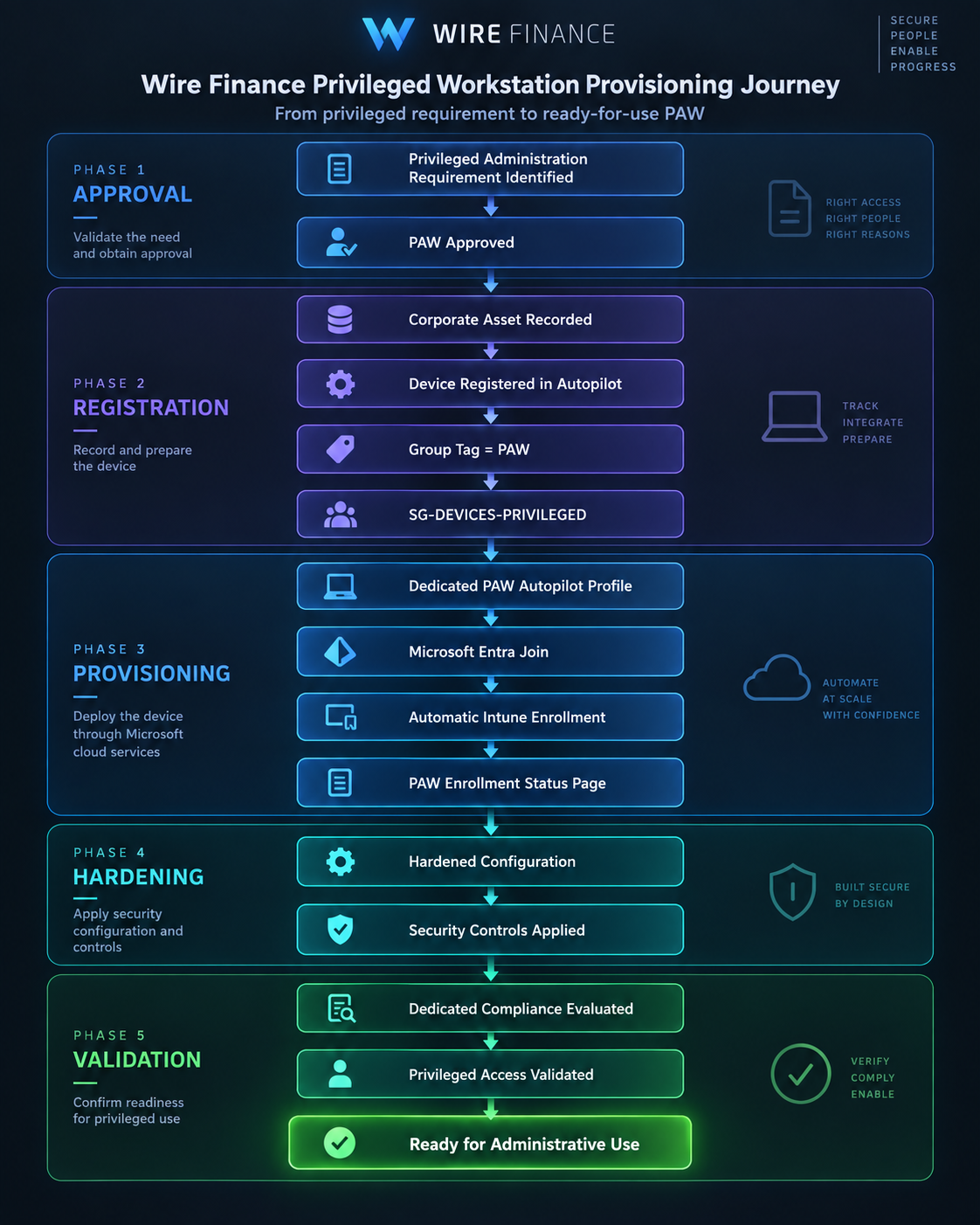
At a high level:
Privileged Requirement Approved
        ↓
PAW Asset Recorded
        ↓
Autopilot Classification = PAW
        ↓
SG-DEVICES-PRIVILEGED
        ↓
Dedicated PAW Provisioning
        ↓
Microsoft Entra Join
        ↓
Microsoft Intune Enrollment
        ↓
PAW Security Controls Applied
        ↓
Compliance Validated
        ↓
Approved for Privileged Use
The device is not considered suitable for administration merely because it has been purchased, named, or joined to Microsoft Entra ID.
It needs to complete the entire privileged-device journey.
Stage 1 — Record the Privileged Asset
A PAW begins as an authorised Wire Finance asset.
For WF-PAW-001, the asset record should identify information such as:
| Field | Example |
|---|---|
| Device Name | WF-PAW-001 |
| Ownership | Corporate |
| Device Class | Privileged Access Workstation |
| Assigned Administrator | Jordan Lee |
| Approved Privileged Identity | adm-jordan.lee |
| Autopilot Classification | PAW |
| Lifecycle Status | Provisioning |
| Security Purpose | Privileged administration |
The important field is the classification:
Device Class = PAW
That classification is security-sensitive.
It determines the provisioning and security journey the device is expected to follow.
Stage 2 — Register the PAW With Windows Autopilot
The privileged device is registered with Windows Autopilot using:
Group Tag
PAW
The tag is represented in the device’s Autopilot metadata as:
[OrderID]:PAW
Wire Finance uses that value to classify privileged devices dynamically.
The intended rule is:
(device.devicePhysicalIds -any (_ -contains "[OrderID]:PAW"))
which targets:
SG-DEVICES-PRIVILEGED
The resulting relationship is:
Autopilot Device
        ↓
Group Tag = PAW
        ↓
[OrderID]:PAW
        ↓
SG-DEVICES-PRIVILEGED
This happens before the device receives its full privileged build.
The Group Tag therefore represents provisioning intent.
It tells Wire Finance:
this device is intended to become a privileged workstation.
It does not prove that the device is already trusted.
Stage 3 — Apply Dedicated PAW Provisioning
The standard corporate build and privileged build should not be treated as interchangeable.
Conceptually:
Standard Corporate Endpoint
        ↓
Corporate User-Driven Profile
while:
Privileged Access Workstation
        ↓
Dedicated PAW Profile
The planned PAW Autopilot profile follows the Wire Finance profile naming convention:
WF_AP_PAW_USER_DRIVEN
Both builds may still use:
Windows Autopilot
Microsoft Entra Join
Microsoft Intune
The difference is what the resulting device is expected to become.
Same Provisioning Technologies
        +
Different Targeting
        +
Different Configuration
        +
Different Security Requirements
        =
Different Trust Tier
Stage 4 — Establish Device Identity and Management
The privileged workstation becomes:
Microsoft Entra Joined
        +
Microsoft Intune Managed
That provides the same core cloud identity and management foundation used for normal corporate endpoints.
The distinction is not:
WF-LT-001
→ Normal Join

WF-PAW-001
→ Special Privileged Join
Instead:
WF-LT-001
      ↓
Microsoft Entra Joined
      ↓
Intune Managed
      ↓
Standard Corporate Endpoint
while:
WF-PAW-001
      ↓
Microsoft Entra Joined
      ↓
Intune Managed
      ↓
Privileged Workstation
The privileged trust level comes from the complete control set applied after classification and enrollment.
Stage 5 — Apply the Hardened PAW Configuration
This is where the PAW begins to differ significantly from the standard employee endpoint.
The planned security model may include stronger requirements around:
- BitLocker
- Microsoft Defender for Endpoint
- Windows Firewall
- attack-surface reduction
- authentication
- application control
- software installation
- browser use
- productivity applications
- updates
- local privilege
- compliance
- Conditional Access
The detailed settings will be defined and implemented later during the endpoint-security and compliance stages.
At this point, we are defining the design requirement:
PAWs receive a stricter security configuration than standard Wire Finance endpoints.
We should not pretend that a control is active merely because it exists in the design.
A PAW Is Not a Productivity Device
One of the strongest rules in the PAW design is separation of purpose.
The privileged workstation is not intended for routine activities such as:
- everyday email
- normal Teams conversations
- general web browsing
- personal websites
- ordinary productivity work
- unrestricted software installation
The normal path remains:
jordan.lee
      ↓
Standard Corporate Endpoint
      ↓
Normal Productivity
Privileged activity follows:
adm-jordan.lee
      ↓
WF-PAW-001
      ↓
Privileged Administration
Wire Finance therefore separates:
Normal Identity
        ≠
Privileged Identity
and:
Normal Device
        ≠
Privileged Device
Together:
Identity Separation
        +
Device Separation
This is stronger than separating the accounts while allowing both identities to operate from the same everyday workstation.
The PAW Does Not Grant Privilege
Possessing a privileged workstation does not automatically make someone an administrator.
This distinction is essential.
Compliant PAW
      ≠
Administrative Permission
Likewise:
Privileged Identity
      ≠
Any Device Is Acceptable
Device trust and administrative authorisation remain separate controls.
The intended model is:
Approved Privileged Identity
        +
Approved Privileged Device
        +
Required Authentication
        +
Approved Administrative Authorisation
        ↓
Privileged Administration
Later, controls such as Privileged Identity Management, privileged-access groups, Conditional Access, and stronger authentication can reinforce this chain.
Those controls belong to the implementation stage.
The design principle is what matters here:
no single control should establish privileged trust by itself.
Naming and Classification Still Do Not Equal Trust
A device named:
WF-PAW-001
has a label describing its intended purpose.
That name does not prove that it received the hardened PAW configuration.
Likewise:
Group Tag = PAW
expresses provisioning intent.
It does not independently establish privileged trust.
The completed state requires more:
Approved PAW Classification
        +
Correct Provisioning
        +
Microsoft Entra Join
        +
Intune Management
        +
PAW Security Controls
        +
Required Compliance
        +
Approved Privileged Identity
Only the complete state matters.
What If a PAW Is Misclassified?
Suppose a device intended to become a PAW is accidentally classified as:
CORPORATE
instead of:
PAW
It could receive the normal employee provisioning path.
Simply changing the Group Tag later would not prove that every expected PAW control has been applied correctly.
Wire Finance should instead return the device to a known-good privileged state.
Misclassification Detected
        ↓
Stop Privileged Use
        ↓
Correct PAW Classification
        ↓
Verify SG-DEVICES-PRIVILEGED Targeting
        ↓
Reset / Reprovision Where Required
        ↓
Apply Correct PAW Configuration
        ↓
Validate Security State
        ↓
Return to Privileged Use
The principle is:
correct the trusted state, not merely the label.
PAW Ready-for-Use Gate
A standard corporate endpoint already needs validation before an employee relies on it.
A privileged workstation requires a higher bar.
Before WF-PAW-001 is approved for administrative use, Wire Finance should verify:
| Validation | Required |
|---|---|
| Corporate asset record exists | Yes |
| PAW requirement and approval recorded | Yes |
| Autopilot registration confirmed | Yes |
Group Tag = PAW |
Yes |
SG-DEVICES-PRIVILEGED targeting confirmed |
Yes |
| Microsoft Entra joined | Yes |
| Microsoft Intune enrolled | Yes |
| PAW security configuration applied | Yes |
| Encryption confirmed | Yes |
| Endpoint-security health acceptable | Yes |
| PAW compliance requirements satisfied | Yes |
| Assigned administrator confirmed | Yes |
Approved adm-* identity confirmed |
Yes |
| Routine productivity use prohibited | Yes |
Only after the required checks succeed do we reach:
WF-PAW-001
      ↓
Correctly Classified
      +
Entra Joined
      +
Intune Managed
      +
Hardened
      +
Compliant
      +
Approved Administrator
      ↓
APPROVED FOR
PRIVILEGED ADMINISTRATION
That is a much higher bar than simply proving that Windows starts and the device can reach Microsoft 365.
Wire Finance PAW Provisioning Decision
The PAW design can now be summarised as:
Device Type
Privileged Access Workstation

Naming
WF-PAW-###

Ownership
Corporate

Provisioning
Windows Autopilot

Autopilot Classification
PAW

Provisioning Group
SG-DEVICES-PRIVILEGED

Planned Autopilot Profile
WF_AP_PAW_USER_DRIVEN

Join Type
Microsoft Entra Joined

Management
Microsoft Intune

Administrative Identity
Approved adm-* identity

Local Rights
Least privilege

Routine Productivity
Not permitted

Security Configuration
Dedicated hardened PAW baseline

Compliance
Dedicated privileged-device requirements

Administrative Access
Separately authorised

Lifecycle
Controlled provisioning, reassignment, reprovisioning, and retirement
The governing principle is:
a PAW is a dedicated trusted administrative endpoint. Naming or classification alone does not establish privileged trust; the device must be correctly provisioned, managed, secured, validated, and used with an approved privileged identity.
Not Every Special Device Is a PAW
Wire Finance now has two very different endpoint journeys:
WF-LT-###
      ↓
Standard Employee Productivity
and:
WF-PAW-###
      ↓
Privileged Administration
But there is another device class we introduced earlier:
WF-TST-###
Those devices exist for controlled testing and validation.
And there is an important distinction.
A pilot device is used to prove that a configuration works safely before wider deployment.
A test device may intentionally be placed into unusual or failing states so Wire Finance can observe how controls respond.
Those are very different objectives.
The next question is:
How should Wire Finance separate safe staged rollout from deliberate testing without placing ordinary production endpoints at unnecessary risk?