
WAZUH INDEXER This is a scalable full-text search engine tat functions to provide advanced security, alerting, index management, deep performance analysis, and other features.
INSTALLATION PROCESS
IMPORTANT: For easy installation, please login as a root user.
This is achievable using the command
sudo su
STEP ONE: Certificate Creation
- Download the wazuh-certs-tool.sh script and the config.yml
curl -sO https://packages.wazuh.com/4.12/wazuh-certs-tool.sh
curl -sO https://packages.wazuh.com/4.12/config.yml
NOTE: You won’t get any reaction when the download is successful.
- Edit config.yml file
nano ./config.yml
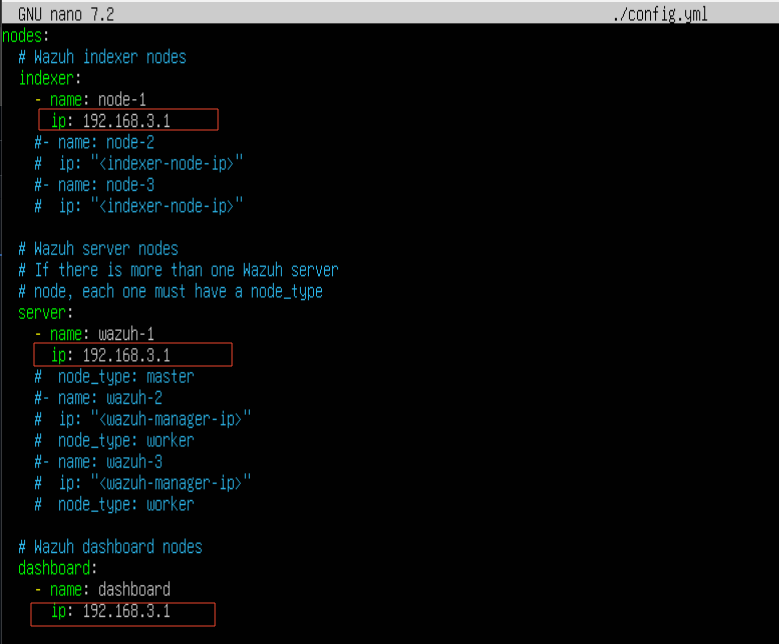
Save the configuration using
Ctrl "x"
press "y"
press "enter"
- Run the * ./wazuh-certs-tool.sh* script for certificate creation by typing. run as root
bash ./wazuh-certs-tools.sh -A
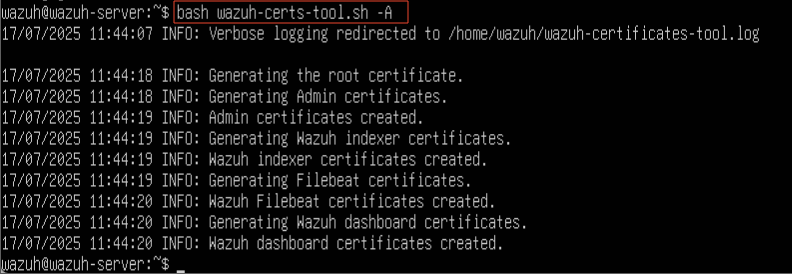
- Compress the required files into a tar file
tar -cvf ./wazuh-certificates.tar
- Extract the compressed file
tar -xf wazuh-certificates.tar
- Create a directory in /etc to securely keep the files for later access/use
mkdir -p /etc/wazuh-certificates/ - Move the extracted files into the created directory
mv wazuh-certificates/* /etc/wazuh-certificates/NOTE: If you get an error because the files were not compressed into a folder, move the files using this command
mv *.pem root-ca.key /etc/wazuh-certificates/
NOTE: The root-ca.key doesn’t need to be used in wazuh config files but keeping it secured is important so changing the permission is advisable
- Ensure proper permission
chmod 600 /etc/wazuh-certificates/*
chown root:root /etc/wazuh-certificates/*
STEP TWO: Packages (Nodes) Installation
- Install the package dependencies
apt-get install debconf adduser procps
- Add the Wazuh repository
- Install missing packages
apt-get install gnupg apt-transport-https - Install the GPG key
curl -s https://packages.wazuh.com/key/GPG-KEY-WAZUH | gpg --no-default-keyring --keyring gnupg-ring:/usr/share/keyrings/wazuh.gpg --import && chmod 644 /usr/share/keyrings/wazuh.gpg- Add the repository
echo "deb [signed-by=/usr/share/keyrings/wazuh.gpg] https://packages.wazuh.com/4.x/apt/ stable main" | tee -a /etc/apt/sources.list.d/wazuh.list - Update the packages information
apt-get update
- Install missing packages
STEP THREE: Wazuh Indexer Installation
- Run the Installation
apt-get -y install wazuh-indexer - Wazuh Indexer Configuration
NOTE: This is a single node installation so there won’t be need to copy the certificate to different nodes. Instead it will be extracted and kept in a safe location.
- Edit the opensearch.yml
nano /etc/wazuh-indexer/opensearch.yml
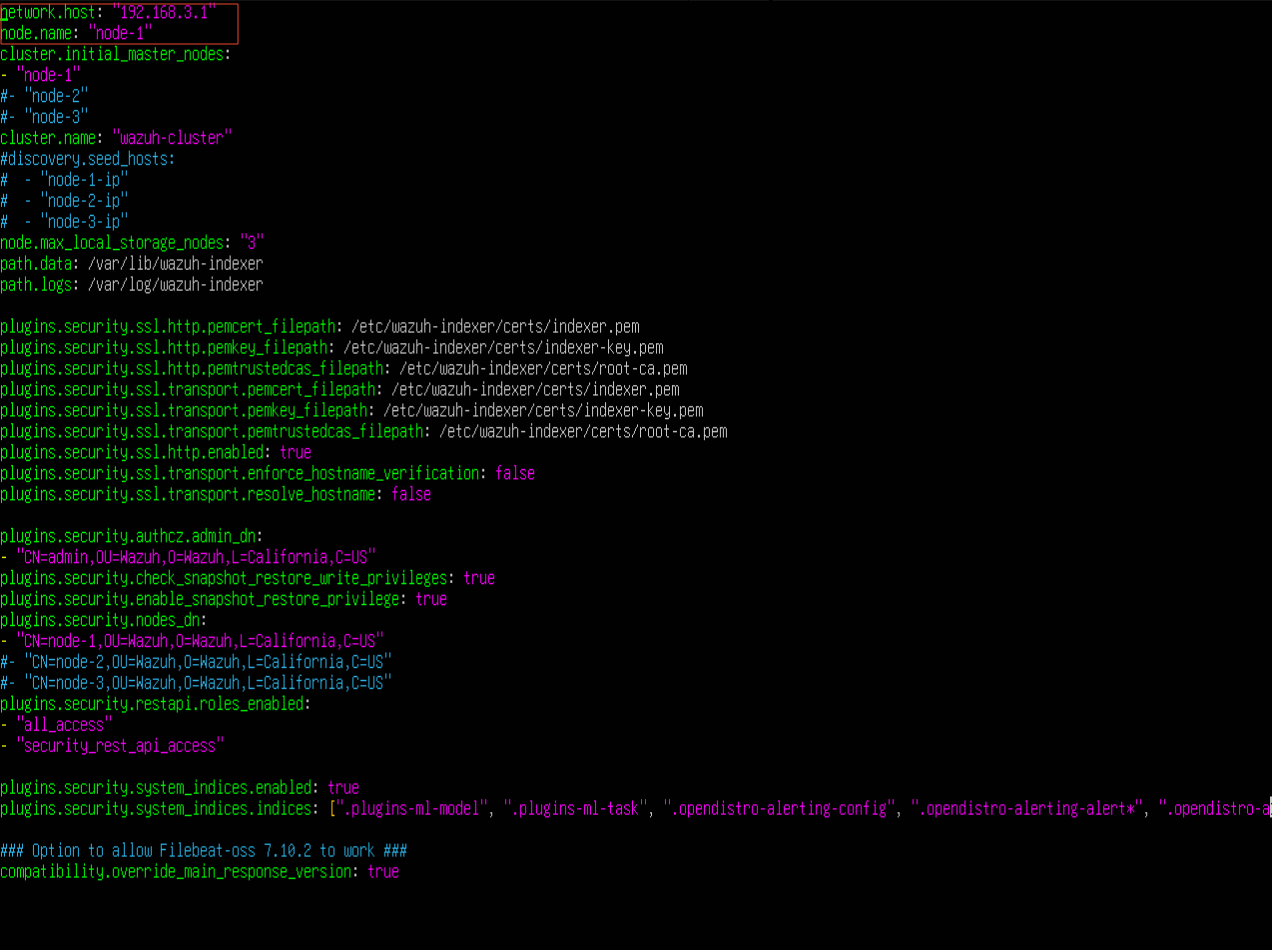
- Deploy Certificates
Deploy SSL certificates to encrypt communications between the Wazuh central components.
NODE_NAME=<INDEXER_NODE_NAME>
NOTE: In this case the indexer_node_name is node-1 Hence my command will be
NODE_NAME=node-1
Create certs directory in the wazuh-indexer directory
mkdir /etc/wazuh-indexer/certs
Extract the content of certificate.tar and move it to /etc/wazuh-indexer/certs/
tar -xf ./wazuh-certificates.tar -C /etc/wazuh-indexer/certs/ ./$NODE_NAME.pem ./$NODE_NAME-key.pem ./admin.pem ./admin-key.pem ./root-ca.pem
Important: Don’t forget to change $NODE_NAME to your node name. In my case it will be
tar -xf ./wazuh-certificates.tar -C /etc/wazuh-indexer/certs/ ./node-1.pem ./node-1-key.pem ./admin.pem ./admin-key.pem ./root-ca.pem
NOTE: If you run into an error during this process, navigate to the wazuh-certificates directory and copy the files to /etc/wazuh-indexer/certs/ using this command
cp *.pem root-ca.key /etc/wazuh-indexer/certs/
Rename $NODE_NAME.pem and $NODE_NAME-key to indexer.pem and indexer-key.pem
mv -n /etc/wazuh-indexer/certs/$NODE_NAME.pem /etc/wazuh-indexer/certs/indexer.pem
mv -n /etc/wazuh-indexer/certs/$NODE_NAME-key.pem /etc/wazuh-indexer/certs/indexer-key.pem
Change permission and ownership
chmod 500 /etc/wazuh-indexer/certs
chmod 400 /etc/wazuh-indexer/certs/*
chown -R wazuh-indexer:wazuh-indexer /etc/wazuh-indexer/certs
- Enable and Start the Indexer
systemctl daemon-reload
systemctl enable wazuh-indexer
systemctl start wazuh-indexer
- Disable Wazuh Updates
sed -i "s/^deb /#deb /" /etc/apt/sources.list.d/wazuh.list
- Run Update
apt update
- Cluster Initialization
/usr/share/wazuh-indexer/bin/idexer-security-init.sh
- Test the Cluster Installation
curl -k -u admin:admin https://<WAZUH_INDEXER_IP_ADDRESS>:9200
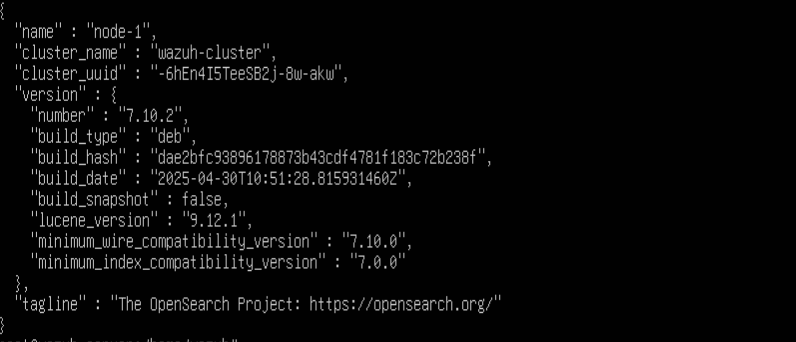
Test node and clusters are working
curl -k -u admin:admin https://<WAZUH_INDEXER_IP_ADDRESS>:9200/_cat/nodes?v
In this situation, mine will be
curl -k -u admin:admin https://192.168.3.1:9200/_cat/nodes?v

 Installing Wazuh Dashboard on Ubuntu24.04