
WAZUH DASHBOARD INSTALLATION
This is a web interface for mining and visualizing the wazuh server alerts and archived events.
STEP ONE: Package Dependencies Installation
sudo apt-get install debhelper tar curl libcap2-bin #debhelper version 9 or later
STEP TWO: Add the Wazuh Repository
- Package Installation
sudo apt-get install gnupg apt-transport-https - GPG Key Installation
sudo curl -s https://packages.wazuh.com/key/GPG-KEY-WAZUH | gpg --no-default-keyring --keyring gnupg-ring:/usr/share/keyrings/wazuh.gpg --import && chmod 644 /usr/share/keyrings/wazuh.gpg - Repository Addition
echo "deb [signed-by=/usr/share/keyrings/wazuh.gpg] https://packages.wazuh.com/4.x/apt/ stable main" | tee -a /etc/apt/sources.list.d/wazuh.list
STEP THREE: Update Packages
sudo apt-get update
STEP FOUR: Dashboard Installation
apt-get -y install wazuh-dashboard
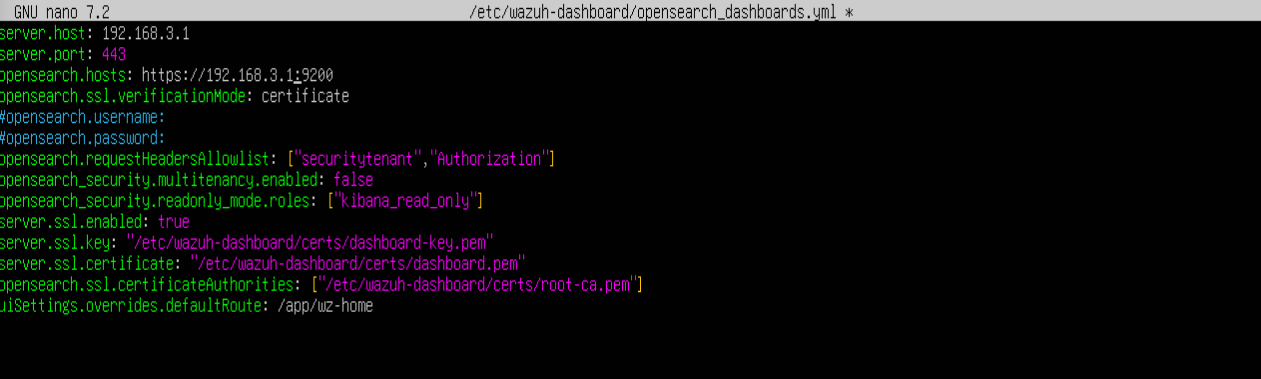
- Dashboard Configuration
sudo nano /etc/wazuh-dashoard/opensearch_dashboards.yml
STEP FIVE: Certificate Deployment
NODE_NAME=<SERVER_NODE_NAME>
- Create a directory named certs in the wazuh-dashboard directory
mkdir /etc/wazuh-dashboard/certs - Compress and move the content of wazuh-certificates into the created directory.
tar -xf ./wazuh-certificates.tar -C /etc/wazuh-dashboard/certs/ ./$NODE_NAME.pem ./$NODE_NAME-key.pem ./admin.pem ./admin-key.pem ./root-ca.pemImportant: Don’t forget to change $NODE_NAME to your node name. In my case it will be
tar -xf ./wazuh-certificates.tar -C /etc/filebeat/certs/ ./node-1.pem ./node-1-key.pem ./admin.pem ./admin-key.pem ./root-ca.pem
- Rename $NODE_NAME.pem and $NODE_NAME-key.pem to dashboard.pem and dashboard-key.pem
mv -n /etc/wazuh-indexer/certs/$NODE_NAME.pem /etc/filebeat/certs/dashboard.pem mv -n /etc/wazuh-indexer/certs/$NODE_NAME-key.pem /etc/filebeat/certs/dashboard-key.pem - Change permission and ownership
chmod 500 /etc/wazuh-dashboard/certs
chmod 400 /etc/wazuh-dashboard/certs/*
chown -R wazuh-dashboard:wazuh-dashboard /etc/wazuh-dashboard/certs
STEP SIX: Start the Wazuh Manager
sudo systemctl daemon-reload
sudo systemctl enable wazuh-dashboard
sudo systemctl start wazuh-dashboard
STEP SEVEN: Configure URL in wazuh.yml
sudo nano /usr/share/wazuh-dashboard/data/wazuh/config/wazuh.yml

Disable Wazuh Update
sudo sed -i "s/^deb /#deb /" /etc/apt/sources.list.d/wazuh.list
sudo apt update
Dashboard is active on port 55000
STEP EIGHT: Accessing the Dashboard
url: https://<wazuh_dashboard_ip_address>
Username: admin
Password: admin
In this case, i will be accessing the dashboard using
url: https://192.168.3.1
 Installing Wazuh on Ubuntu24.04