Before we create the first Wire Finance user, group, or administrative role, we need somewhere to build them.
Our IAM design tells us what the environment should look like.
Now we need a working Microsoft environment that can support those decisions.
For Wire Finance, that begins with establishing an organisational tenant and confirming that the required identity and security capabilities are available.
Setting Up the Microsoft Environment
The first requirement was a dedicated Microsoft organisational tenant for Wire Finance.
During the setup process, I used Microsoft Partner Center’s Value Added Reseller enrolment route and the Microsoft 365 E5 product page (This gave me access to an extendable one month free trial).
These were the Microsoft entry points involved:
The objective was to establish an independent organisational environment where Wire Finance could manage its identities, groups, administrative roles, endpoints, and security controls.
This separation matters.
We don’t want to mix organisational identities and security configurations with a personal Microsoft environment.
With the organisational tenant established, we now had the foundation on which to build the Wire Finance identity infrastructure.
However, having a tenant was only the first requirement.
We also needed the licensing capabilities to support the security controls planned in our IAM design.
Establishing Microsoft 365 E5 Licensing
Wire Finance uses Microsoft 365 E5, with 25 licensed seats available for the environment.
I verified that the Microsoft 365 E5 subscription was active in the Microsoft 365 admin center.
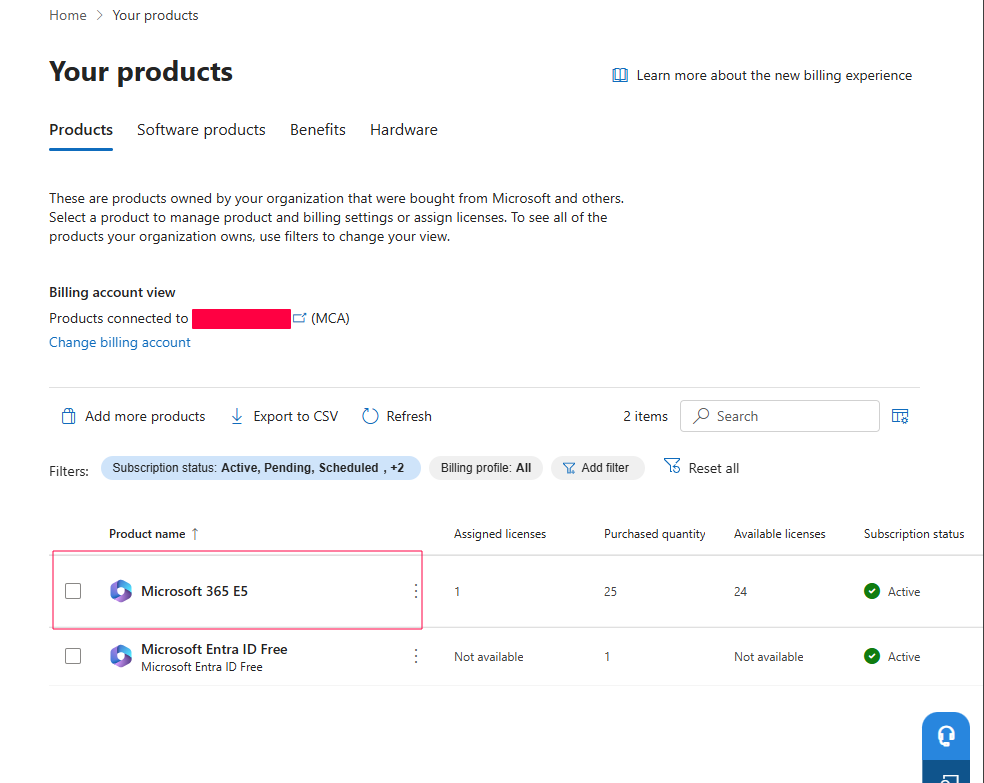
One of the reasons for selecting E5 was its inclusion of Microsoft Entra ID P2 capabilities.
These support advanced identity security features such as:
- Conditional Access
- Microsoft Entra ID Protection
- Risk-based access decisions
- Privileged Identity Management (PIM)
These capabilities are important because our IAM design includes stronger authentication, identity risk management, and controlled administrative access.
But there is an important distinction:
Having these capabilities available does not mean they are already configured or protecting the environment.
At this stage, we were establishing the foundation.
The actual policies, administrative permissions, and security controls will be implemented and validated as the project progresses.
The Initial Administrative Account
During tenant setup, an initial administrative account was used to establish and configure the environment.
This account was also assigned a Microsoft 365 E5 licence during the initial setup stage.
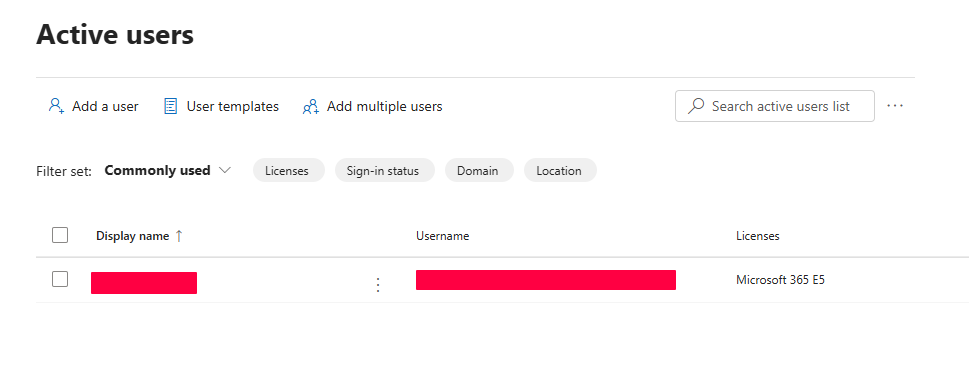
This reflects how the environment was initially established. It does not mean every administrator requires an E5 licence simply to perform administrative tasks.
It is also important to distinguish initial setup access from the administrative-access model we intend to operate.
Earlier in our IAM design, we established that privileged access should use:
- Dedicated
adm-*administrative identities - Least-privilege permissions
- Privileged access groups
- Controlled and auditable administrative access
The initial administrator provides the access required to establish the environment.
As we progress, the goal is to move towards the deliberate privileged-access model already designed for Wire Finance rather than relying on broad administrative permissions for routine operations.
Why Licensing Matters Before Configuration
Imagine reaching the Conditional Access or Privileged Identity Management stage only to discover that the required capabilities are unavailable.
We would have an identity design that the environment could not fully support.
That is why confirming the tenant and its licensing capabilities is an important early step.
For Wire Finance, the foundation looks like this:
Microsoft Organisational Tenant
             +
      Microsoft 365 E5
         (25 Seats)
             ↓
    Microsoft Entra ID P2
       Capability Available
             ↓
      Ready for Tenant Review
This doesn’t mean the environment is fully secured.
It means we have confirmed that the platform can support the identity controls we intend to introduce.
A Note About Microsoft Portals
Microsoft regularly updates the layout and navigation of its administrative portals.
Menus, settings, and available options may change over time.
Throughout this project, we’ll focus on four things:
- What we are configuring
- Why the configuration is required
- What result we expect
- How we validate that result
Where portal navigation was recorded during implementation, we’ll include those paths to help readers follow along.
Screenshots will provide supporting evidence of the environment at different stages.
The aim is not simply to reproduce clicks, but to understand the purpose and outcome of each configuration.
The Foundation Is Established
At this point, Wire Finance has:
- A dedicated Microsoft organisational tenant
- An active Microsoft 365 E5 subscription
- 25 E5 licensed seats
- Confirmed Microsoft Entra ID P2 capability
- An initial administrative account for environment setup
We have established the foundation, but we haven’t yet demonstrated that the tenant’s starting configuration is suitable for our design.
Before building our workforce identities and access structures, we need to understand what already exists inside the environment.
What settings are already in place?
Which capabilities are available?
And what needs to be reviewed before we start making changes?
That brings us to the next stage.
Next: Tenant Review — establishing a verified baseline before we begin building the Wire Finance identity model.